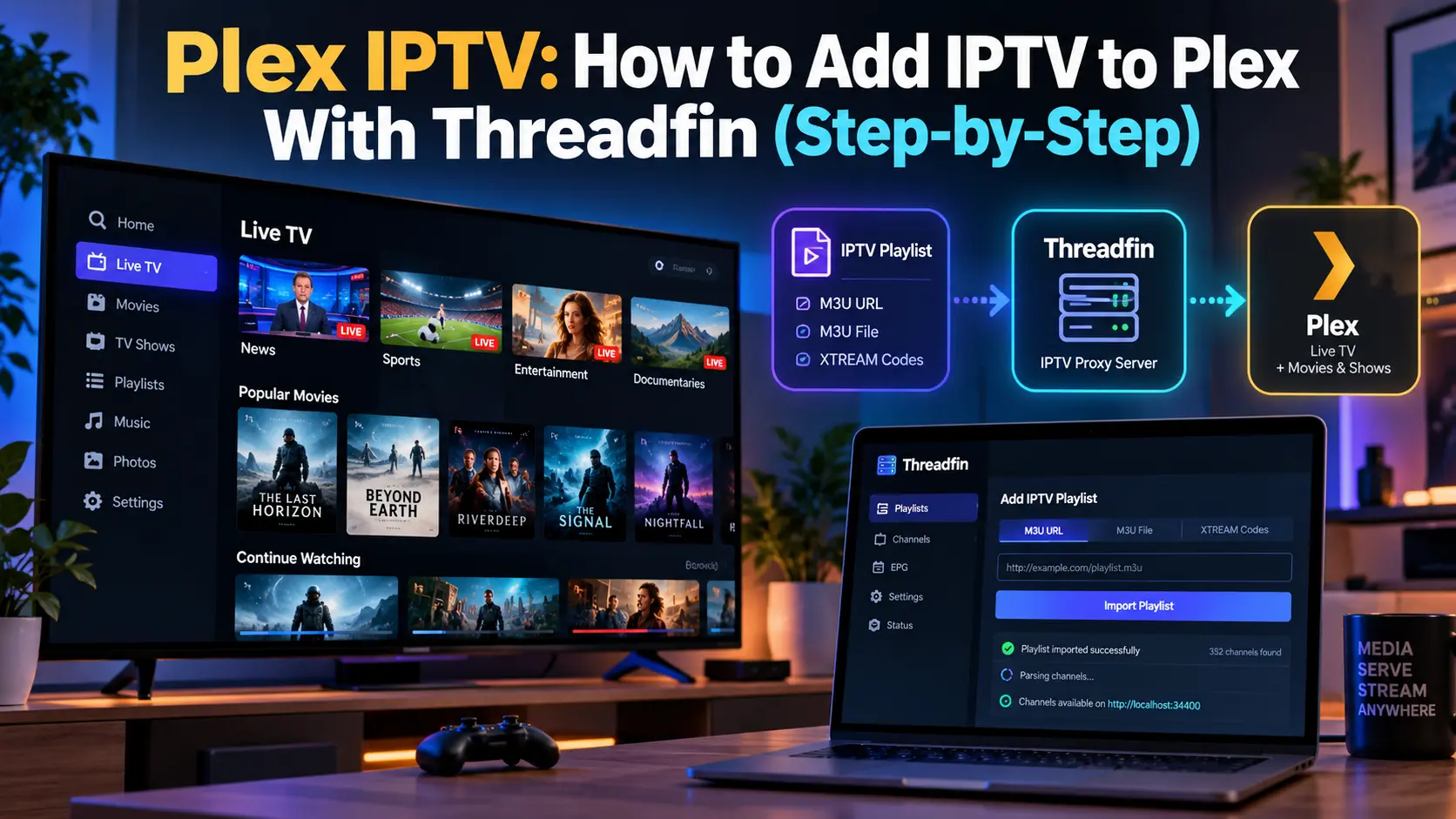

Plex IPTV setups let you watch live IPTV channels inside the Plex app, next to your movies and shows, with a full TV guide and even DVR recording. Plex doesn’t read M3U playlists on its own, though. To add IPTV to Plex, you run a small free tool called Threadfin that turns your playlist into a virtual TV tuner Plex can understand. This guide explains how IPTV on Plex works, what you’ll need, how to set it up step by step on a Plex server, and how to fix the most common problems.
Key takeaways (TL;DR)
- Plex has no native IPTV or M3U support. You add IPTV to Plex through Threadfin (or the older xTeVe), which presents your playlist as a tuner in Plex’s Live TV & DVR.
- Threadfin requires Plex Media Server with an active Plex Pass, which costs $6.99 a month or $69.99 a year.
- Old Plex IPTV plugins no longer work. Plex sunset plugins in 2018, saying fewer than 2% of users relied on them.
- Plex is only the player. Your channels must come from a licensed provider or a legal free playlist.
Can Plex Play IPTV?
Not directly. Plex’s Live TV & DVR feature was built for TV tuners, and Plex’s list of supported DVR tuners covers hardware such as SiliconDust HDHomeRun, Hauppauge and VBox devices, not IPTV playlists. On the Plex forum, a community member relaying the developers’ position put it simply: “There is no such thing as native IPTV support in Plex.”
That’s where Threadfin comes in. According to its GitHub page, Threadfin is “an M3U proxy for Kernel/Plex/Jellyfin/Emby based on xTeVe”. It loads your M3U playlist and XMLTV guide, then offers them to Plex as a DVR tuner. If you’re new to IPTV itself, start with our guide to what IPTV is and how it works.
How Plex IPTV Works
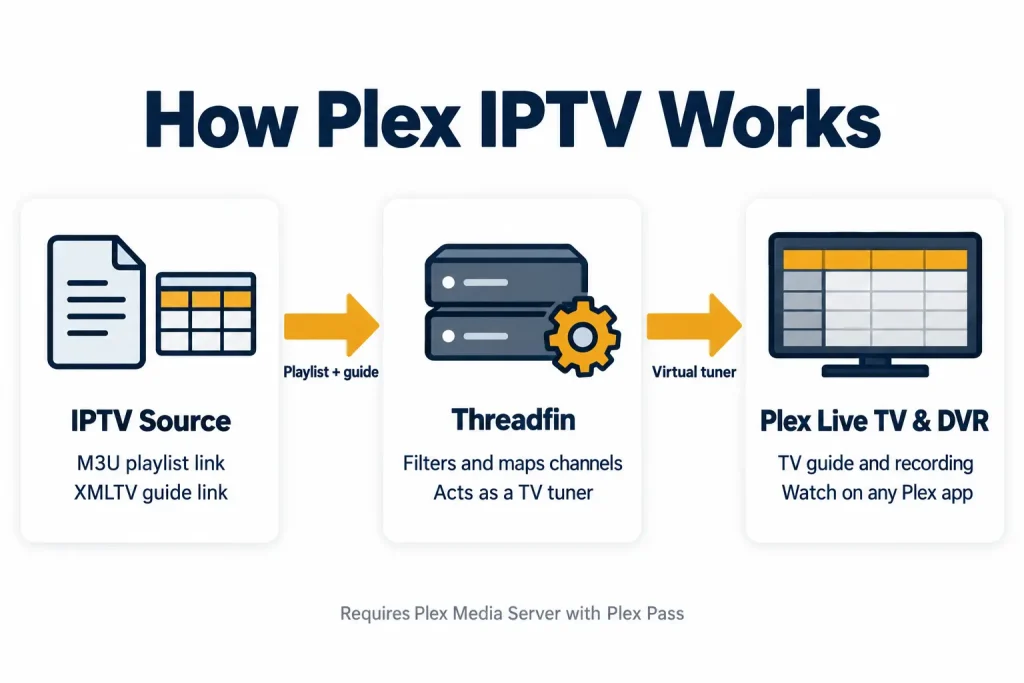
The setup has three parts:
- Your IPTV source: an M3U playlist link and, ideally, an XMLTV (EPG) guide link.
- Threadfin: runs on the same computer or network as your Plex server, filters and maps channels, and presents them as a tuner.
- Plex Media Server: adds Threadfin as a DVR device, downloads the guide and streams channels to every Plex app.
Requirements: What You’ll Need
- Plex Media Server: version 1.11.1.4730 or newer, installed on a PC, Mac, NAS or Linux machine.
- An active Plex Pass: Threadfin lists it as a requirement, and Plex says DVR recording is a premium feature.
- Threadfin: free and open source (MIT licence), usually run with Docker.
- An M3U playlist link: from one of the licensed IPTV providers we recommend, or a free legal playlist.
- An XMLTV guide link (optional): needed for a proper TV guide. Many providers include one.
- A stable home network: your Plex server and Threadfin should use a fixed (static) IP address.
Plex Pass currently costs $6.99 a month or $69.99 a year. The lifetime plan rose to $749.99 on 1 July 2026, 9to5Mac reported.
How to Add IPTV to Plex: Step-by-Step
Part 1: Install Threadfin for your Plex IPTV server
Step 1: Install Docker on the computer or NAS that runs your Plex server.
Step 2: Pull the official Threadfin image, fyb3roptik/threadfin, using the sample docker-compose file in the Threadfin README.
Step 3: Map port 34400 and start the container.
Step 4: Open http://YOUR-SERVER-IP:34400/web/ in a browser to reach the Threadfin web interface.
Part 2: Add IPTV M3U to Plex through Threadfin
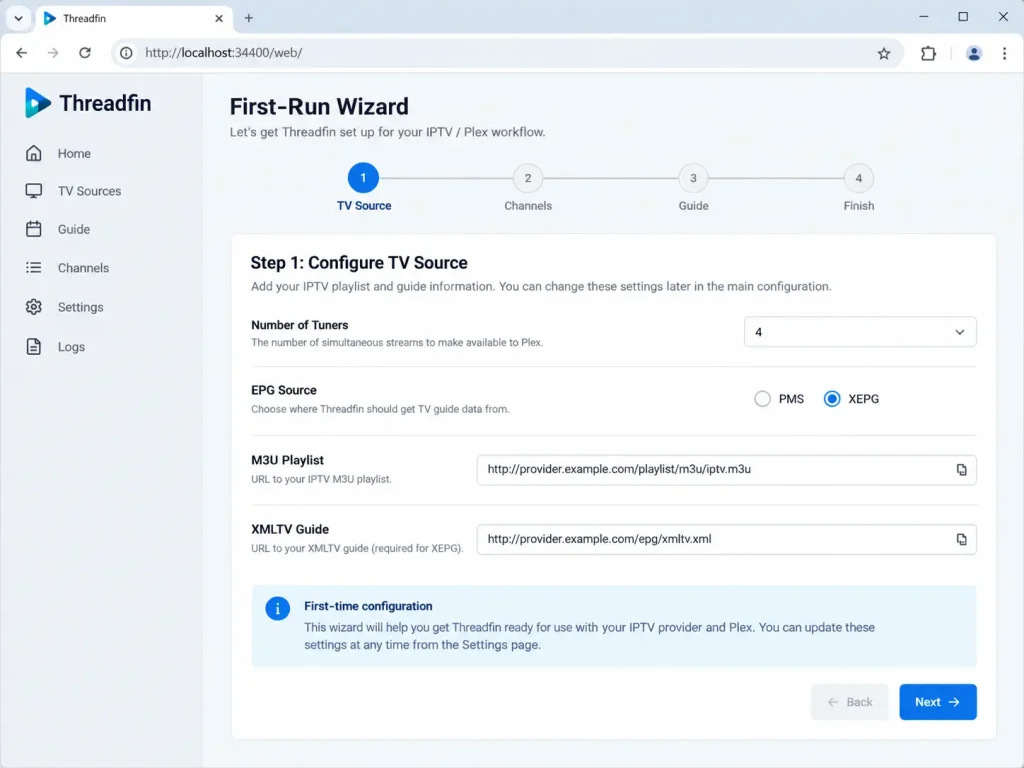
Step 5: In the setup wizard, set the number of tuners to the number of streams your IPTV provider allows at once.
Step 6: Choose XEPG as the EPG source, so Threadfin builds the guide for Plex.
Step 7: Paste your M3U playlist URL.
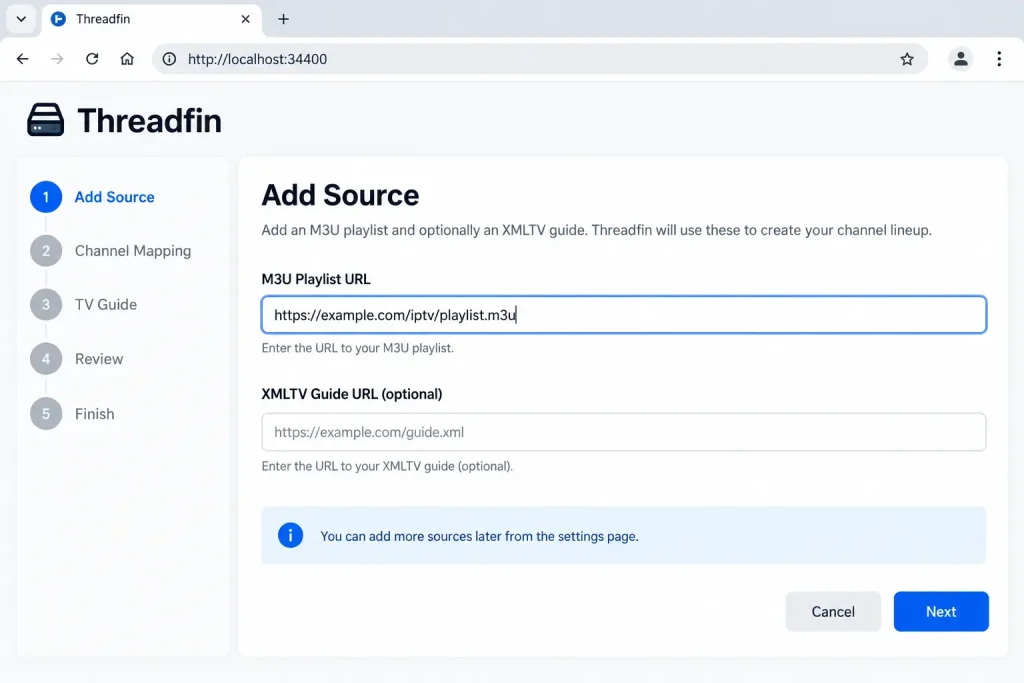
Step 8: Paste your XMLTV guide URL.
Step 9: Open the Filter menu and keep only the channel groups you want, so Plex doesn’t load thousands of channels.
Part 3: Map IPTV channels in Threadfin
Step 10: Open the Mapping menu.
Step 11: Assign each channel to its XMLTV guide entry. Only active (green) channels are passed to Plex.
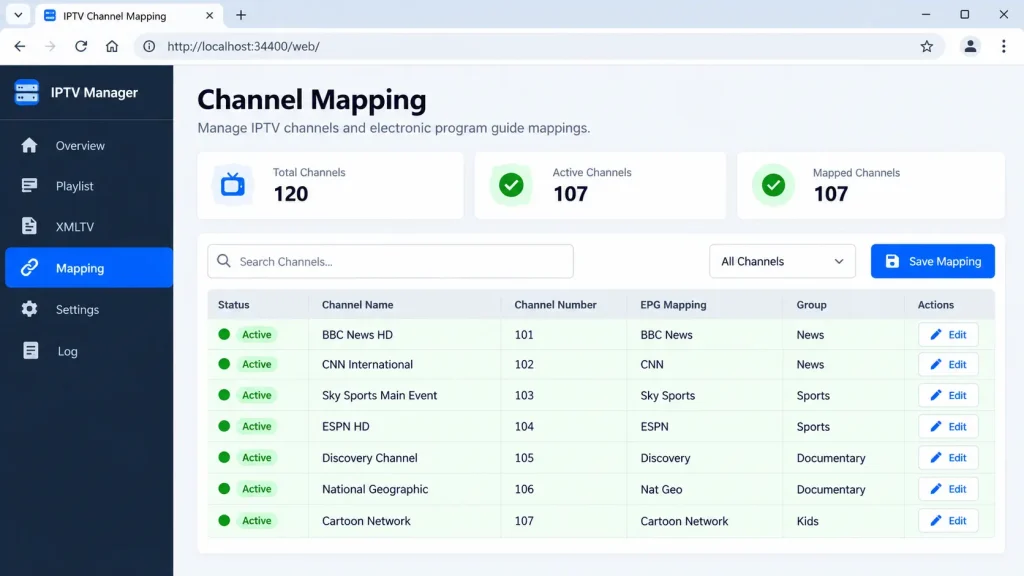
Step 12: Click Save so Threadfin generates the channel lineup and guide file.
Step 13: Copy the DVR IP (for example 192.168.1.20:34400) and the XEPG guide URL from the Overview page.
Channels are matched automatically when the tvg-id in your M3U matches the XMLTV channel ID, according to the xTeVe documentation that Threadfin still points users to.
Part 4: Add IPTV to Plex Live TV & DVR
Step 14: Open Plex Web and go to Settings › Live TV & DVR.
Step 15: Click DVR Setup to start the wizard.
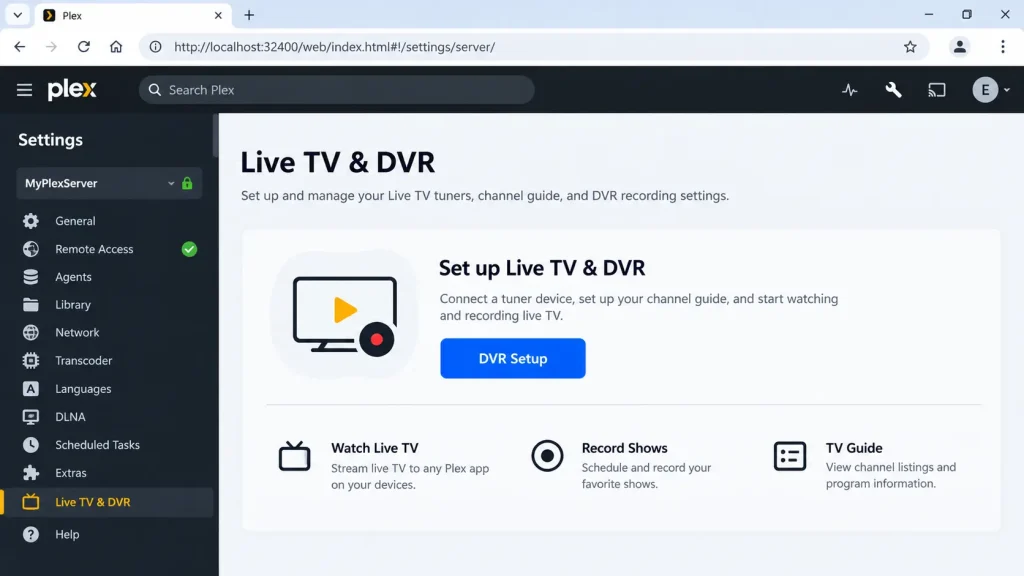
Step 16: If Plex doesn’t find Threadfin automatically, choose the option to enter the device address manually and paste the DVR IP from Step 13.
Step 17: Select the Threadfin tuner and click Continue.
Step 18: When asked for guide data, choose the XMLTV option and paste the XEPG guide URL from Step 13.
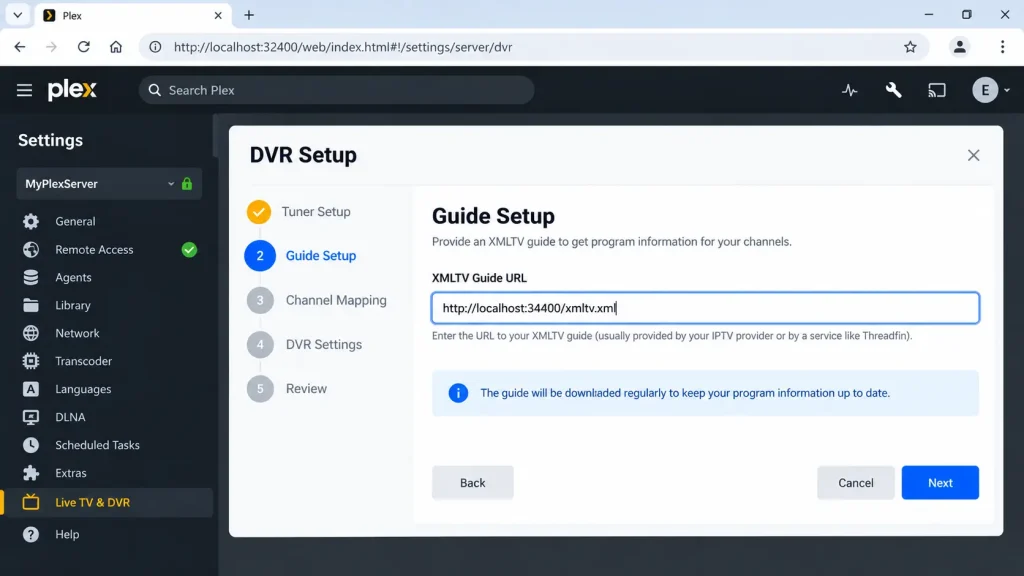
Step 19: Review the channel list and click Continue to download the guide.
Plex’s own Live TV & DVR guide notes that guide data can take a while to download, and recommends a static IP or DHCP reservation so the server can always find network tuners.
Part 5: Watch IPTV in Plex
Step 20: Open any Plex app on the same account, such as Plex on a smart TV, Fire TV, Roku, phone or web browser.
Step 21: Select Live TV from your server in the sidebar, then pick a channel from the guide.
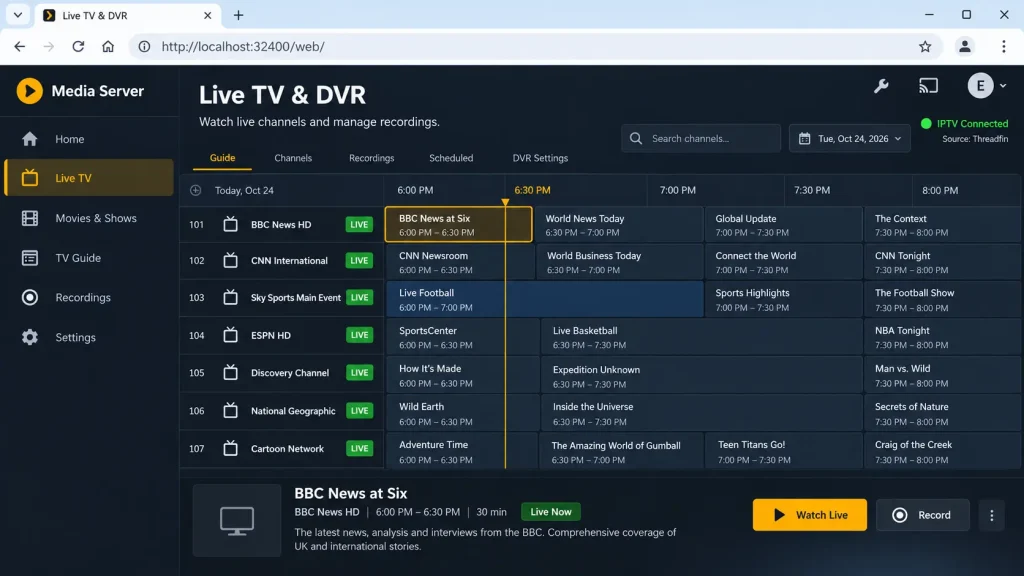
With Plex Pass, you can also press Record on any programme to save it to your Plex library.
Plex IPTV Plugin and Addon: Do They Still Work?
No. Many older guides on Reddit and forums mention an IPTV plugin for Plex (often called IPTV.bundle). Plex announced in 2018 that it would sunset plugins, saying fewer than 2% of users relied on them and that the feature was built on an outdated protocol, TechCrunch reported. Today, the Threadfin method in this guide is the practical way to get IPTV into Plex.
Plex IPTV Troubleshooting: Common Problems and Fixes
- Plex can’t find the IPTV tuner: enter the Threadfin DVR IP manually, check that port 34400 is open, and make sure Plex and Threadfin are on the same network.
- Channels show but have no guide: map each channel to an XMLTV entry in Threadfin, click Save, then refresh the guide in Plex.
- The guide won’t load in Plex: don’t use a GZIP-compressed guide link. The xTeVe documentation notes that Plex does not support GZIP.
- “Could not tune channel” or a black screen: the stream may be offline or your provider’s connection limit is reached. Lower the tuner count in Threadfin to match your plan.
- Buffering in IPTV on Plex: enable Threadfin’s buffer setting, use a wired connection for the server, and avoid transcoding by matching the stream quality to your device.
- Live TV disappeared after a restart: give the server a static IP, so the DVR address doesn’t change.
- Too many channels: use Threadfin’s filters to remove groups you don’t watch. Large playlists make the Plex guide slow.
Plex vs Other Ways to Watch IPTV
Threadfin works well, but it takes setup time. Depending on your needs, an alternative may be easier:
| Option | M3U support | Cost | Best for |
|---|---|---|---|
| Plex + Threadfin | Through Threadfin | Plex Pass required | One library with TV guide and DVR |
| Jellyfin | Built-in M3U tuner and XMLTV | Free and open source | Self-hosters who want native IPTV |
| Dedicated IPTV player | Built-in | Free to a few dollars | Quick setup on one device |
| VLC | Opens M3U links | Free | Testing a playlist |
The Jellyfin documentation lists M3U as a supported tuner, which “allows you to add IPTV channel playlists which you can view and record”. If you just want to watch on one TV, try TiviMate or another app from our IPTV player guide, or test your link first with IPTV on VLC.
Choosing an IPTV Provider for Plex
Plex, Threadfin and VLC are only tools: they include no channels. The best IPTV provider for Plex is a licensed one that gives you an M3U link and XMLTV guide, and allows enough simultaneous connections for your tuner count. For free, legal channels, see our guide to IPTV GitHub playlists. Avoid cheap “Plex IPTV” subscriptions promoted on Reddit that bundle premium sport and pay-TV channels for a few dollars: they’re usually unlicensed and can be blocked without warning. Our list of legal IPTV services covers licensed options by country.
Frequently Asked Questions About Plex IPTV
-
Why is Plex not illegal?
Plex is media software. It organises and streams files you own and channels from tuners you connect, much like a DVD player plays the discs you insert. What can be illegal is the content: loading an unlicensed IPTV playlist into Plex is still copyright infringement. Read is IPTV legal? for the rules by country.
-
Is Plex better than IPTV?
They do different jobs. IPTV is a source of live channels, while Plex is a media server and player. With Threadfin, you can combine them and watch IPTV inside Plex with a guide and DVR. If you only want live TV on one device, a dedicated IPTV player is simpler.
-
How to setup IPTV?
Get an M3U link from a licensed provider, install an IPTV player or a media server such as Plex with Threadfin, then add the playlist and guide link. For licensed providers, see our IPTV service guide.
-
Can I add my streaming services to Plex?
Partly. In Plex’s Discover feature, you can select the streaming services you subscribe to, and Plex will show where to watch a title. But Plex says “content from other streaming services does not play in Plex”: selecting a title opens that service’s own app instead.
Final Thoughts: Is Plex IPTV Worth Setting Up?
A Plex IPTV setup is worth it if you already run a Plex server with Plex Pass and want live channels, a full TV guide and DVR recording in one app. Threadfin does the heavy lifting by turning your M3U playlist into a tuner, and once it’s mapped, every Plex device gets your channels. Load only licensed or legal free sources, and see our legal IPTV options and IPTV legality explained before you start. New to all this? Read how IPTV works first, or compare more apps in our best IPTV player guide.